
arewecooked.dev
Tinkering the bleeding edge. AI writes the code, I curate.
Squeezing Pixels Down the Pipe
TL;DR: We built a stupendously fast lossless frame compression codec.
In Sending Pixels, we explored every codec we could get our hands on. HEVC was too slow and too lossy. ProRes was gorgeous but Apple-only. Raw pixels needed 28 Gbps we didn't have.
We needed something different. Something faster than HEVC, lossless if possible, and built for GPUs that aren't just Apple's. So we built it.
Compression is finding the least bits for most information
Under the hood, all compression does three things:
- Identify structure. A desktop screenshot isn't random noise—it's text on backgrounds, gradients, flat colors, repeated UI elements.
- Exploit that structure. Separate what matters (shapes, edges) from what's redundant (solid fills, smooth gradients).
- Encode the result in the fewest bits possible. Frequent patterns get short codes. Rare ones get long codes. Approach the theoretical minimum.
Not all images carry maximum information density. In fact, most screen content is surprisingly redundant — a code editor is mostly empty space with repeated syntax highlighting, and a desktop UI reuses the same colors across thousands of pixels. That redundancy is free compression waiting to be exploited.
We sat down with Claude Code and mapped out the strategy space. The core logic is simple: analyze the image → identify patterns → compress the patterns in the least number of bits.
The question was how to do each step fast enough for 60fps.
TurboWave
The ideas behind this aren't new — wavelet-based compression is what JPEG 2000 does, and it's been battle-tested for decades. We're standing on that foundation. The difference is the constraint: JPEG 2000 was designed for file compression where latency doesn't matter. We need the entire pipeline — capture, encode, transmit, decode, render — to fit inside 16 milliseconds. Pixel to pixel. That's the bar for "cable feel."
Our implementation is TurboWave. It uses wavelet transforms to break down the image into simpler data that can be compressed — the same core math as JPEG 2000, but re-architected from scratch for GPU-parallel real-time encoding.
Building a Custom Harness
We wrote a dedicated benchmark tool — tbbenchmark. This tightened the loop for Claude Code, it could make experimental suggestions, write code. Edit, evaluate, discard or keep.
We also kept a running WHAT_WE_TRIED.md log — every experiment, what we expected, what actually happened, and why. If you are curious, the entire saga is included in the git repo.
Inside a Tile
A 64×64 tile starts as 4,096 raw pixels. The pipeline transforms them into a compressed bitstream: Color → DWT → rANS. Each stage does one job, but altogether the goal is to identify patterns in the 4096 pixels and compress them as tight as possible.
We chose the 64x64 tile after experimenting with a few options — a larger tile allows us to extract more entropy but the amount of work increases proportionately. 32x32 increases the overhead since each compressed tile carries additional metadata. We found 64x64 to be the right trade-off.
Color Transform YCoCg-R
All three RGB channels swing wildly across the rainbow. After YCoCg-R, each channel becomes a smooth gradient — exactly the kind of slowly-varying signal that wavelets compress well.
The first step of the process is to de-correlate colors. Why? Because RGB channels are heavily correlated — a bright pixel tends to be bright in red, green, and blue simultaneously. If we try to compress RGB directly, we're encoding the same "brightness" information three times.
YCoCg-R separates brightness (Y) from color (Co, Cg). Now the Y channel carries most of the signal, while Co and Cg are small residuals that cluster around zero — exactly the kind of distribution that compresses well. Better yet, YCoCg-R is reversible with integer math (no rounding errors), so we stay lossless with zero floating-point overhead.
DWT Level 1: Split
First, the Discrete Wavelet Transform. It splits the tile into four quadrants:
- LL (top-left): Low frequencies in both directions. This is the "blurry thumbnail"—the overall shape.
- LH (bottom-left): Low horizontal, high vertical. Horizontal edges.
- HL (top-right): High horizontal, low vertical. Vertical edges.
- HH (bottom-right): High frequencies in both directions. Diagonal edges, texture, noise.
Most of the information stays in LL. The other quadrants capture detail—and detail tends toward zero for smooth regions.
DWT Level 2: Split Again
We take the LL quadrant and split it again. The new LL is even more concentrated. The new detail bands capture the next level of refinement.
Each level, the "shape" gets smaller and denser with information, while the "details" get sparser.
DWT Level 4: Almost Done
After four levels, our 64×64 tile has become:
- A tiny 4×4 LL subband (the average color, basically)
- Plus all the detail coefficients at various scales
Here's the key insight: for typical desktop content, most of those detail coefficients are zero or near-zero.
Solid backgrounds? Zeros. Smooth gradients? Mostly zeros. Sharp text edges? A few non-zero coefficients, but sparse.
The DWT hasn't compressed anything yet—it's reorganized the data so that most values cluster around zero. Now we need something to turn that statistical pattern into actual compression.
rANS: The Entropy Coder
This is where the bytes actually shrink. rANS (range Asymmetric Numeral Systems) is an entropy coder—it assigns shorter bit sequences to symbols that appear more often, and longer sequences to rare ones.
After the DWT, our coefficient stream is full of zeros and small values, with occasional large spikes. rANS sees this distribution and thinks: "zeros are cheap, I'll encode those in a fraction of a bit. That rare coefficient of 847? That'll cost more." The output approaches the theoretical minimum—Shannon entropy—for the given distribution.
Why rANS instead of Huffman? Two reasons. First, rANS achieves fractional bit lengths. Huffman rounds up to whole bits, which wastes space when your most common symbol has probability 0.7 (optimal: 0.51 bits, Huffman: 1 bit). Second, rANS decoding is a simple state machine—perfect for GPU parallelism. Each tile gets its own rANS stream with its own frequency table, so all 4,000 tiles encode and decode independently.
Desktop Content is Boring (And That's Great)
We benchmarked TurboWave across hundreds of real-world frames. Desktop content turns out to be shockingly compressible:
- Code editor — text on solid background — 7% of raw. 14× smaller, losslessly.
- Desktop UI with windows, buttons, icons — 10% of raw.
- Web browsing — more images, more variation — 13% of raw.
- Photo editing with complex images — 20% of raw.
- Video playback of complex scenes — 35%+ of raw.
For typical desktop use, we're getting 7-10× lossless compression. No artifacts. No quality loss.
But information theory doesn't negotiate. A frame of visual noise — confetti, particle effects, film grain — has genuine entropy. No codec can compress randomness.
Making It Fast
Our codec works. The math is sound. We started with a straightforward CPU implementation. Wavelet transform, histogram, entropy coding — all in Swift, single-threaded to get the algorithm right.
It worked. Bit-perfect reconstruction. Solid compression ratios. And over a second per frame.
At 60fps we need 16.67ms. We were 60× too slow. A CPU-only path was never going to scale to 5K at 60fps.
What About the GPU?
GPUs are built for this kind of work — thousands of threads churning through pixels. The wavelet transform parallelizes beautifully: each tile is independent, each row operation is independent.
CPU
1 core churning through 4,000 tiles sequentially. >1,000ms
GPU — 4,000 threads
4,000 threads × 1 dispatch = done. ~194ms
But entropy coding is inherently sequential. rANS encodes by maintaining a state machine—each symbol depends on the previous state. You can't split that across threads.
Unless you're clever about it.
The insight: make each tile its own independent rANS stream. A 5K frame splits into ~4,000 tiles at 64×64. Each tile gets its own frequency table, its own state, its own bitstream. The tiles don't talk to each other. Now you have 4,000 independent entropy coding jobs—and GPUs eat independent jobs for breakfast.
This is TurboWave's architecture.
The Obvious Wins
The first version dispatched one GPU command per tile. At 5K resolution, that's ~4,000 dispatches per frame. Each dispatch has overhead: validation, scheduling, synchronization.
The fix was embarrassingly obvious in hindsight: batch everything into a single command buffer.
// Before: one dispatch per tile
for tile in tiles {
    encoder.dispatch(tile)  // 4000× overhead
}

// After: one dispatch for all tiles
encoder.dispatchThreadgroups(
    MTLSize(width: tileCount, height: 1, depth: 1),
    threadsPerThreadgroup: MTLSize(width: 64, height: 1, depth: 1)
)
194ms → 45ms. A 4× improvement from not doing something stupid.
Memory Patterns
GPUs are weird. They're massively parallel, but they have opinions about how you access memory.
The cardinal rule: adjacent threads should read adjacent memory. When thread 0 and thread 1 read bytes that are next to each other, the GPU fetches one cache line and both threads win. When they read bytes that are far apart, you get two fetches and everything slows down.
Our original code processed tiles in "logical" order—which meant threads were jumping all over memory. We restructured to process in memory order, and suddenly the GPU's caches started working for us instead of against us.
45ms → 18ms. Another 2.5× from respecting the hardware.
The Algorithm
The Discrete Wavelet Transform has two implementations: the "textbook" version with explicit filter convolution, and the "lifting" version that does the same math with half the operations.
We knew lifting existed. We didn't know the details. Claude did.
// Textbook: 4 multiplies, 4 adds per coefficient
low[i] = c0*x[2i-1] + c1*x[2i] + c2*x[2i+1] + c3*x[2i+2];
high[i] = d0*x[2i-1] + d1*x[2i] + d2*x[2i+1] + d3*x[2i+2];

// Lifting: 2 adds, 2 shifts per coefficient
d[i] = x[2i+1] - ((x[2i] + x[2i+2]) >> 1);     // predict
s[i] = x[2i] + ((d[i-1] + d[i]) >> 2);          // update
Same output. Half the compute. We also vectorized YCoCg using SIMD intrinsics and parallelized the histogram computation for rANS.
18ms → 8.2ms.
Pedal to the Metal
We'd picked the low-hanging fruit. The medium-hanging fruit. Even the "you need a ladder" fruit. What remained was... the stuff stuck to the branch.
Every optimization at this stage was measured in microseconds:
- Removed bounds checks in inner loops (images are always multiples of 8, and the GPU doesn't have exceptions anyway)
- Tuned threadgroup sizes for M-series GPU occupancy
- Inlined small functions to eliminate call overhead
- Reordered operations to reduce register pressure
8.2ms → 6.94ms. Each microsecond was fought for instruction by instruction.
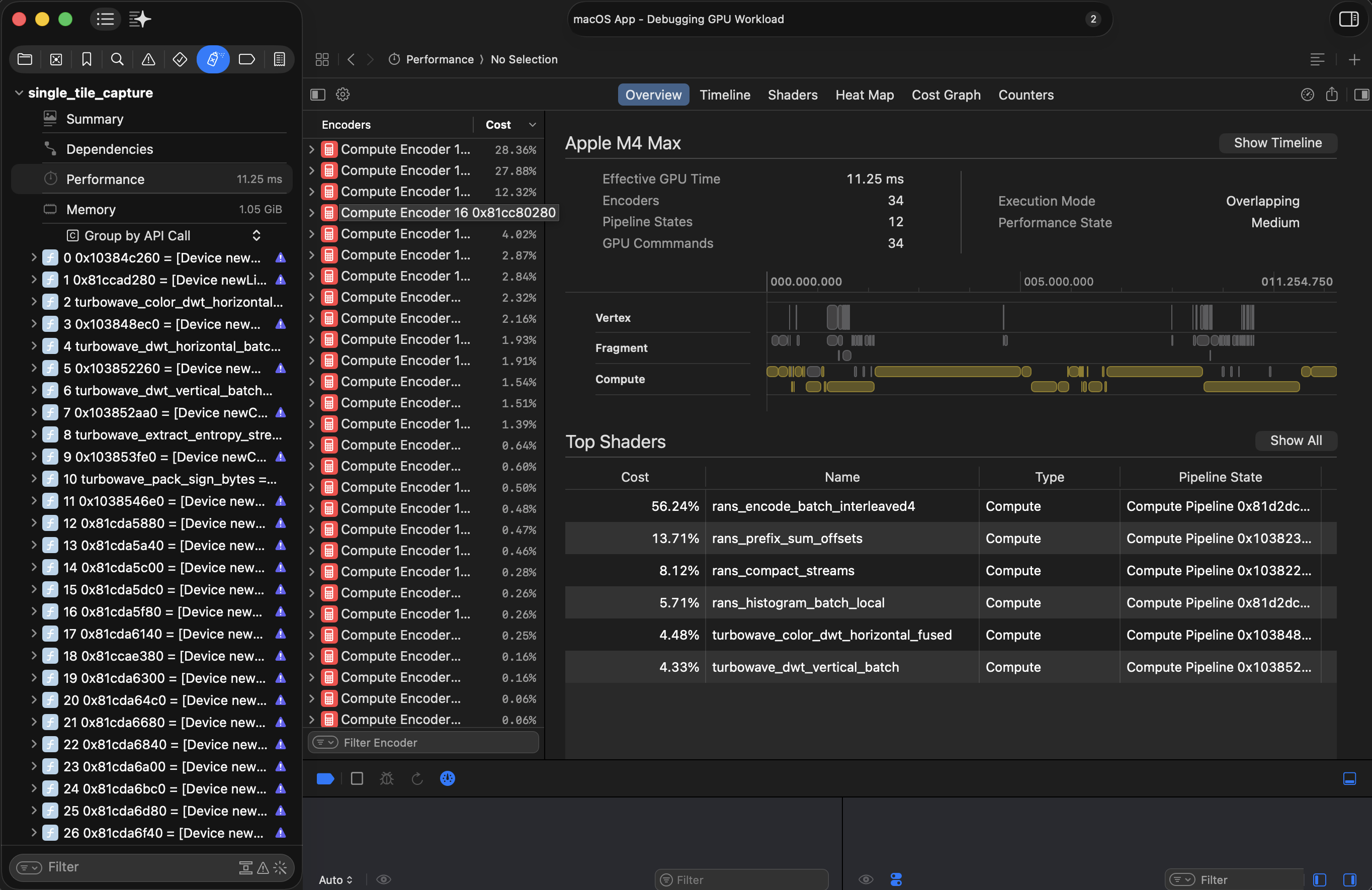
28× faster than where we started. And more importantly: under our target.
Results
We benchmarked TurboWave against every codec we could get our hands on. Same frames, same hardware, same test harness.
3024×1964 desktop content, 80 frames. Bars show p50, faded tail shows p99.
When It Works
Let's do the math on a good frame. Typical desktop content at 3K resolution:
- Encode: 7.94ms
- Network: 0.5ms (at 11% compression, ~2.5MB over Thunderbolt)
- Decode: ~11ms
- Overhead: ~1ms
Total: ~20.5ms. Over the 16.67ms single-frame budget—but each stage clears individually. We can sustain 60fps throughput; we're just one frame behind on glass-to-glass latency.
For most desktop use, that extra frame of lag is imperceptible.
When It Doesn't
Now let's do the math on a bad frame. Video playback with complex content:
- Encode: 7.94ms
- Network: 4ms+ (at 35% compression, ~8MB takes longer)
- Decode: ~11ms
- Overhead: ~1ms
Total: ~24ms. Almost two frames behind. The pipeline stalls. Frames drop.
This is the fundamental truth: lossless compression = variable bitrate. We can't guarantee how well any given frame will compress. A sudden cut to confetti and the whole pipeline backs up.
Can We Fix It by Adding AI?
Naturally, our first instinct was to throw a neural network at the problem. It's 2026. That's just what you do now.
The hypothesis was appealing: Downsample the image aggressively on the encode side — say, 1/2 in each dimension (which is 4× fewer pixels, so 4× less data), and then use a super-resolution model on the decode side to upscale it back? Free ~25% of original, as we can simply just send the RAW pixel. The decoder does the heavy lifting to reconstruct detail.
This is asymmetric by design — the decoder works harder than the encoder. That's backwards from how most codecs work, where encoding is expensive and decoding is cheap. But in our case, the encoder is a GPU that's already under load running a game. If we could keep the encode cheap and shift the reconstruction work to the decode side, that's a win.
We built TurboWave SR to test this. It's even faster. Then we looked at the output.
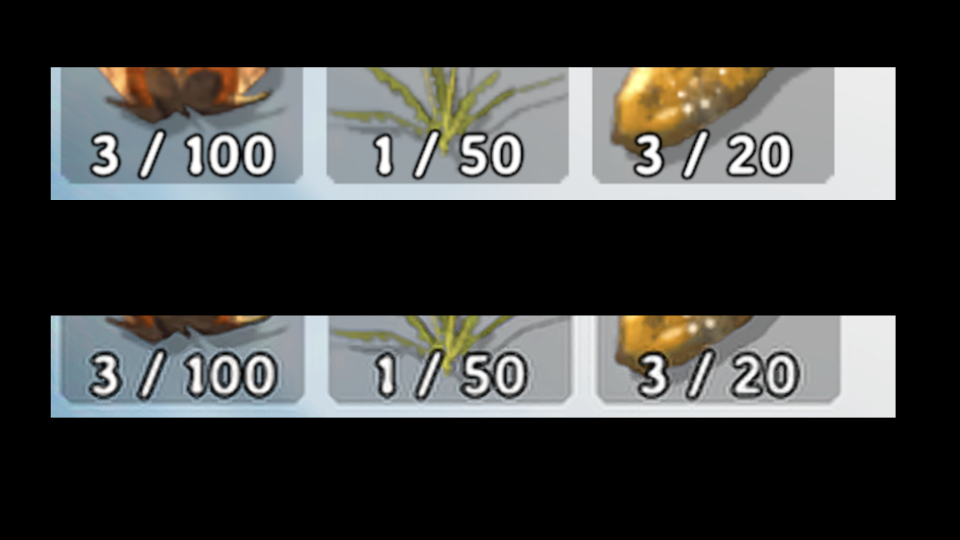
SR destroys text. It smears fine detail. UI elements get soft edges. Basically everything that makes a desktop look like a desktop — sharp text, crisp icons, pixel-perfect borders — gets mangled by the upscaler. It's doing its job, hallucinating.
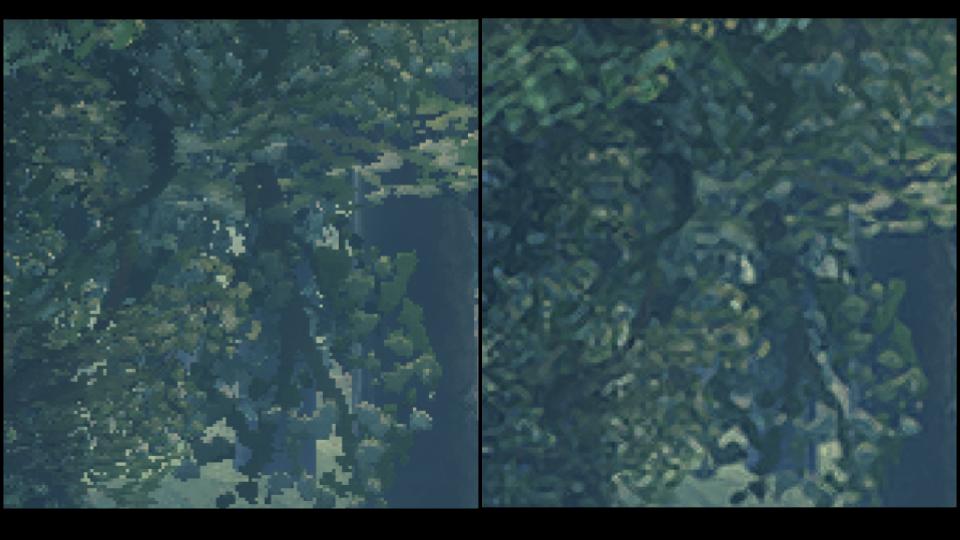
The reality is that generic super-resolution models are trained on natural images — landscapes, faces, objects. Desktop content is the opposite of what they're good at: precise, synthetic, high-frequency structure that must be pixel-perfect.
To make this work, we'd likely need some form of neural compression — a model trained specifically to compress, and decompress optimized for our pipeline. That's a research project, not an engineering one. Unless someone wants to sponsor a few dozen NVIDIA B200's we are going to skip that journey.
Key Takeaways and Lessons
Tight feedback loops accelerate everything. Claude Code + benchmarks meant we could try ten ideas in the time it would take to manually implement one. Most failed. The winners stacked.
Information theory doesn't negotiate. You can reorganize entropy. You can exploit patterns. You cannot compress randomness. Eventually, you have to choose what to lose.
Understand what your code actually does. The DWT doesn't compress—it reorganizes. rANS doesn't reduce entropy—it exploits it. Knowing the mechanics shows you where the limits are.
What's Next
TurboWave is stupendously fast at lossless compression. But lossless means variable bitrate, and variable bitrate means we can't guarantee every frame fits the budget. Turbowave also has a finite cost, it takes a fixed amount of time to finish the tile, therefore it cannot stream naturally.
We need a way to choose what to lose — intelligently, and stream it. And we need to handle the frames where even smart lossy compression isn't enough.
That's the next post.
TurboWave is open source on GitHub.