
arewecooked.dev
Tinkering the bleeding edge. AI writes the code, I curate.
What It Takes to Send Pixels (and Make Them Appear in Reasonable Time)
TL;DR: What does it actually take to send pixels from one computer to another and have it feel instant? A lot of interesting trade-offs.
Display cables feel like magic. Plug in HDMI or DisplayPort, and pixels just... appear. No lag. No compression artifacts. It just works.
But what's actually happening? Can we replicate it by daisy-chaining two computers?
We had a reason to find out: we wanted to use one monitor with two computers without swapping cables. What if the Mac was the KVM? We already got Mac-to-PC networking working over USB-C at 5-10 Gbps. Can we send pixels over it?
Short answer? Yes, but we want it to feel like a cable, not like a network.
The Ideal World: Just Send Everything
In a perfect world, you'd send raw pixels. No compression. No quality loss. The GPU renders a frame, you grab it, you send it.
This is actually what your monitor does. DisplayPort and HDMI are streaming raw pixels at ridiculous bandwidth, DisplayPort 2.1 pushes 80 Gbps. No encoding. No decoding. Just bits flying down a wire.
5K resolution is 5120 × 2880 pixels. Each pixel is 4 bytes (RGBA). That's 58.98 megabytes per frame.
At 60fps, that's 3.5 gigabytes per second. Or about 28 Gbps.
The pipeline is beautiful. Capture: ~1ms. Send: ~1ms. Receive: ~1ms. Render: ~1ms. Total: under 5ms. This is what "cable feel" looks like.
If you have infinite bandwidth, you're done. Ship it.
Our Real World: The Bottleneck
We don't have infinite bandwidth. We have a USB-C cable running at 5 Gbps. Maybe 10 Gbps on a good day. We still haven't cracked getting it to 20 Gbps.
Here's the thing nobody tells you: you don't have a full second to send a frame. At 60fps, you have 16.67 milliseconds. And in those 16 milliseconds, you need to capture, send, receive, and render.
Raw pixels at 5K/60fps need ~28 Gbps. We have 5. Broken.
Attempt 1: Compress It
Raw doesn't fit. So we compress.
HEVC is the industry standard. What Netflix uses. What game streaming uses. It's what everyone recommends.
HEVC can compress 5K video down to ~50-100 Mbps. That's 0.8-1.7 megabits per frame. Now we're talking. That fits in our 5 Gbps with room to spare.
We set up an NVENC encoder on Windows, sent HEVC frames over the network, decoded on the Mac. It worked.
Kind of.
Problem 1: Inter-Frame Fragility
HEVC is an inter-frame codec by default. It achieves those incredible compression ratios by referencing previous frames. "This pixel is the same as 3 frames ago, so I'll just point to it instead of encoding it again."
Great for Netflix. Problematic for real-time streaming.
If we lose a single frame, the decoder can't reconstruct subsequent frames. The entire pipeline breaks. One dropped packet and suddenly we're staring at corrupted garbage until the next keyframe.
Solution: Force HEVC to intra-frame mode. Every frame is self-contained. Lose one, the next one still works. But now our compression ratios tank from 100:1 to maybe 20:1.
Problem 2: Latency
Even with intra-frame, encoding takes time , 6.5ms encode, 3.5ms decode with NVENC P1 at 5K. That's 10ms in codec alone, out of a 16.6ms frame budget at 60fps. The network is fast, but we're spending most of our time compressing and decompressing.
That leaves ~6ms of headroom for capture, network transfer, and rendering. One slow encode and frames start piling up , miss one deadline and the next frame stacks behind it.
Problem 3: Visual Quality
Here's the thing that really got us: HEVC optimizes for bandwidth, not quality. It's designed to make videos small enough to stream over bad internet connections.
We have a USB cable. We don't need 50 Mbps. We need pixels that look correct.
Dark scenes? Blocky mess. The algorithm sees "these pixels are all similar-ish black" and crushes them together. Here's our solar eclipse wallpaper:
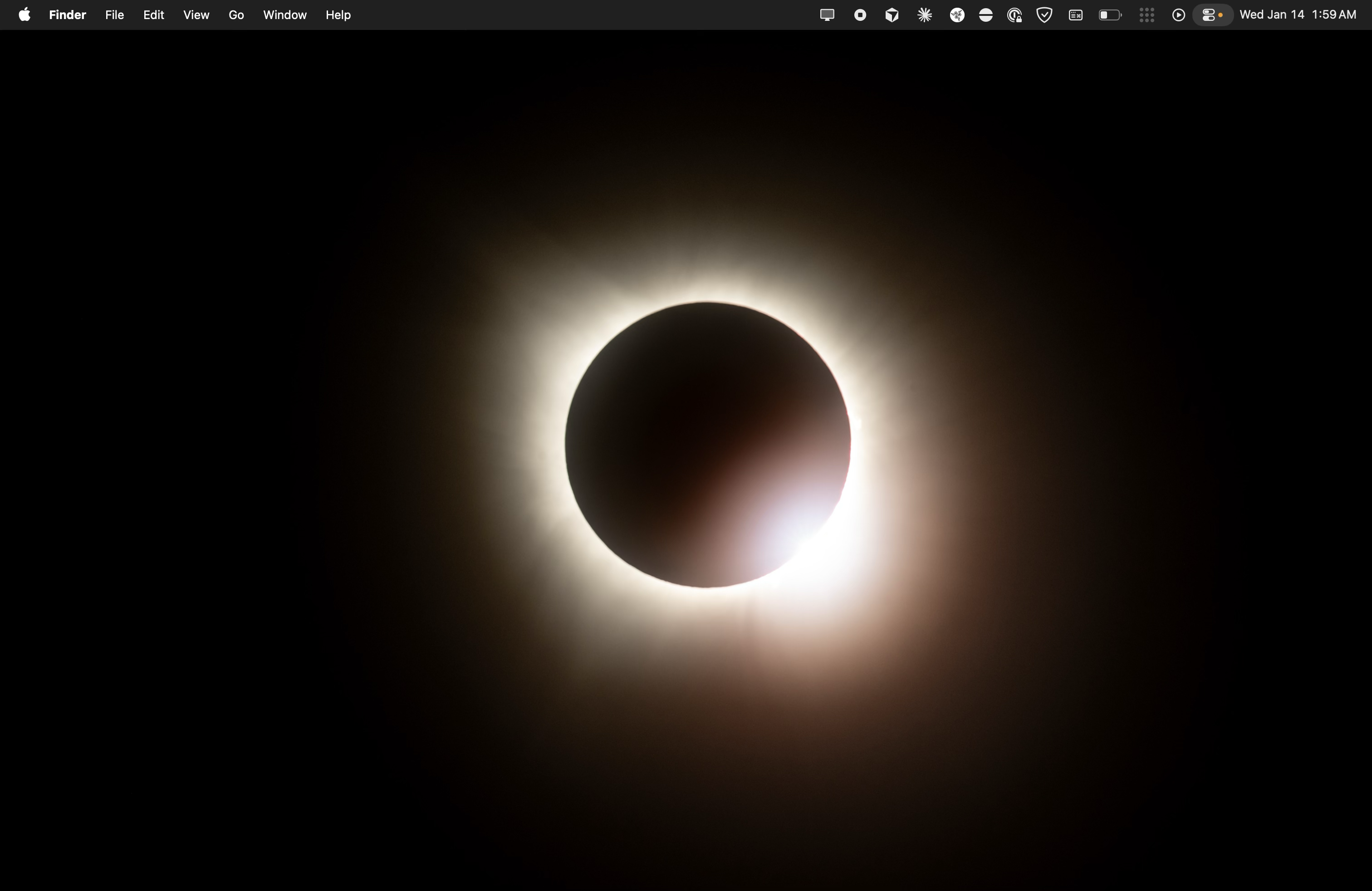
Original desktop with solar eclipse wallpaper
And here's the delta between raw and HEVC (amplified 10x to make artifacts visible):
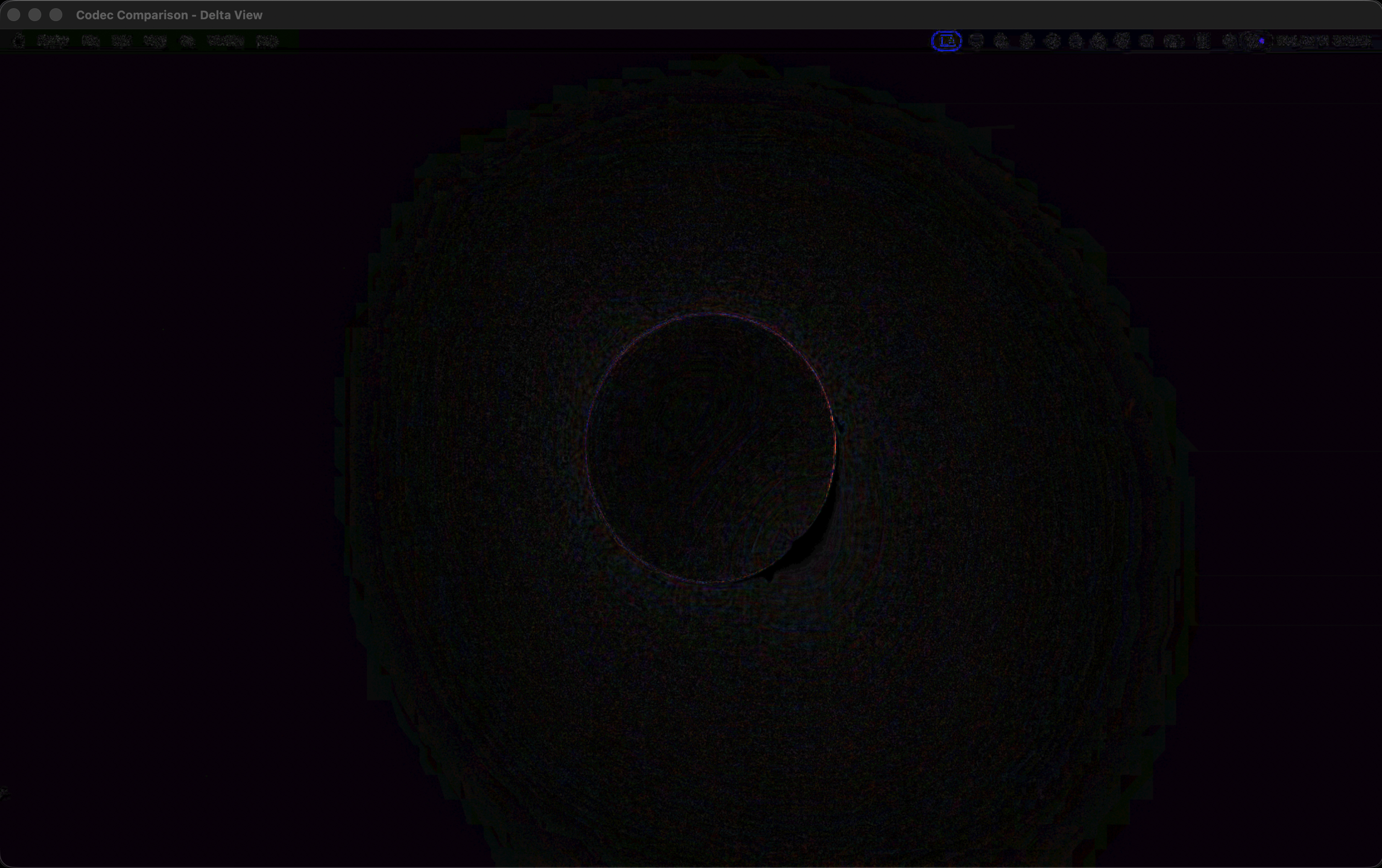
Delta view: RGB differences amplified 10x. Concentric rings = DCT block artifacts. Menu bar rainbow = chroma subsampling.
See those concentric rings around the corona? That's HEVC's block-based compression struggling with subtle gradients. And the rainbow noise in the menu bar? That's 4:2:0 chroma subsampling — HEVC halves the color resolution, and high-contrast text pays the price. This is at maximum quality settings.
Text? Even worse. Sharp edges, high contrast, no motion to exploit — HEVC wasn't designed for this. Windows desktop and Steam UI look like they're being viewed through fog.
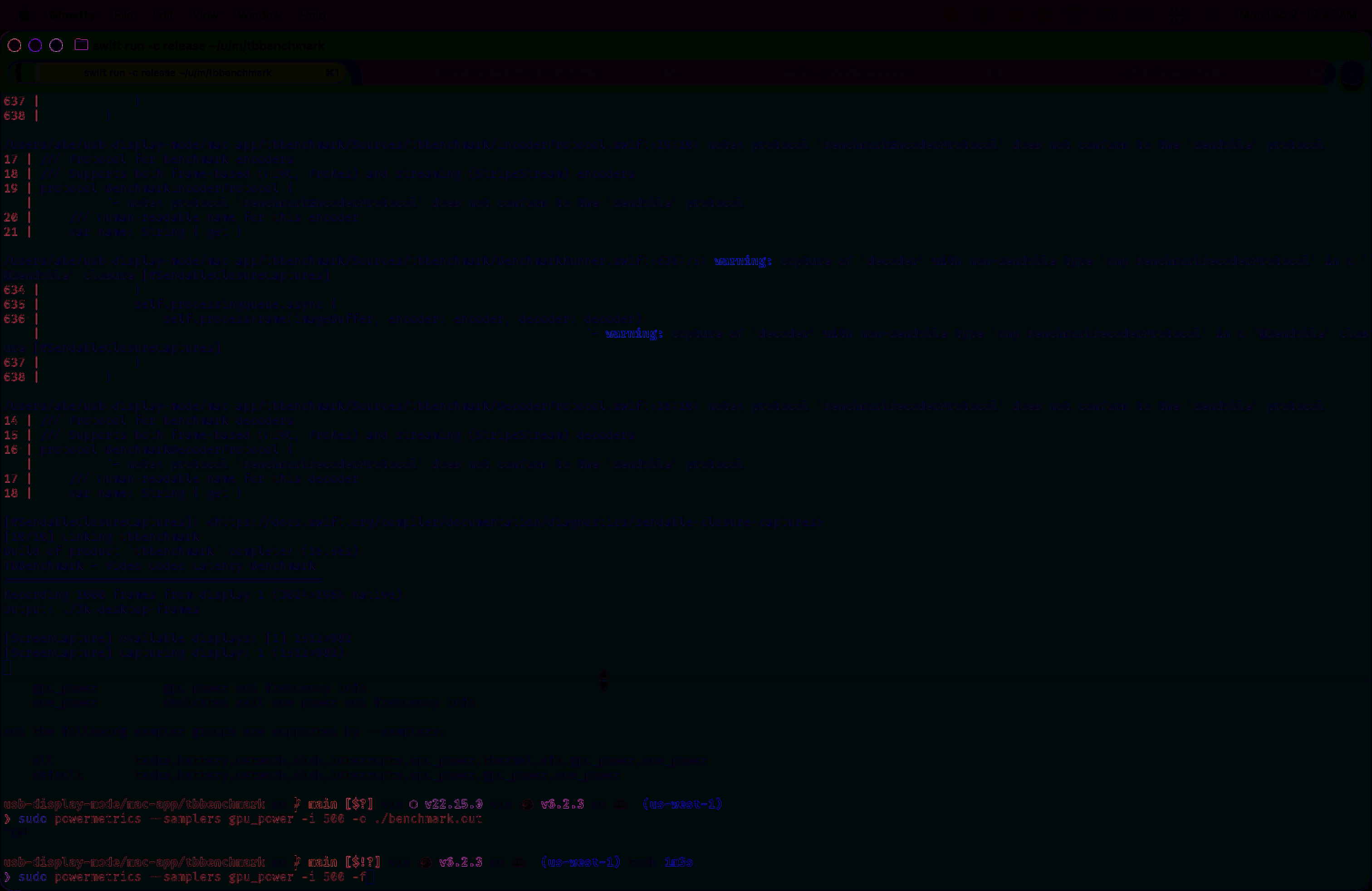
Delta view: HEVC artifacts on a text-heavy desktop. Every character gets a colored halo — the codec's block boundaries collide with sharp text edges.
HEVC optimizes for constrained networks. We have a dedicated cable. Different problem.
Attempt 2: A Different Codec?
Apple designed ProRes for professional video editing, where color accuracy matters and the benchmark is RAW. It has properties that happen to be perfect for real-time streaming:
- Intra-frame only. Every frame is self-contained. No fragility.
- Hardware accelerated. Apple Silicon has dedicated ProRes encode/decode blocks — 3.5ms encode, 3ms decode at 5K. That's ~1.5x faster than HEVC intra.
- Quality preservation. Even at 422, the difference from raw is minimal. At 4444, it's imperceptible.
Text stays sharp. Dark scenes stay smooth.
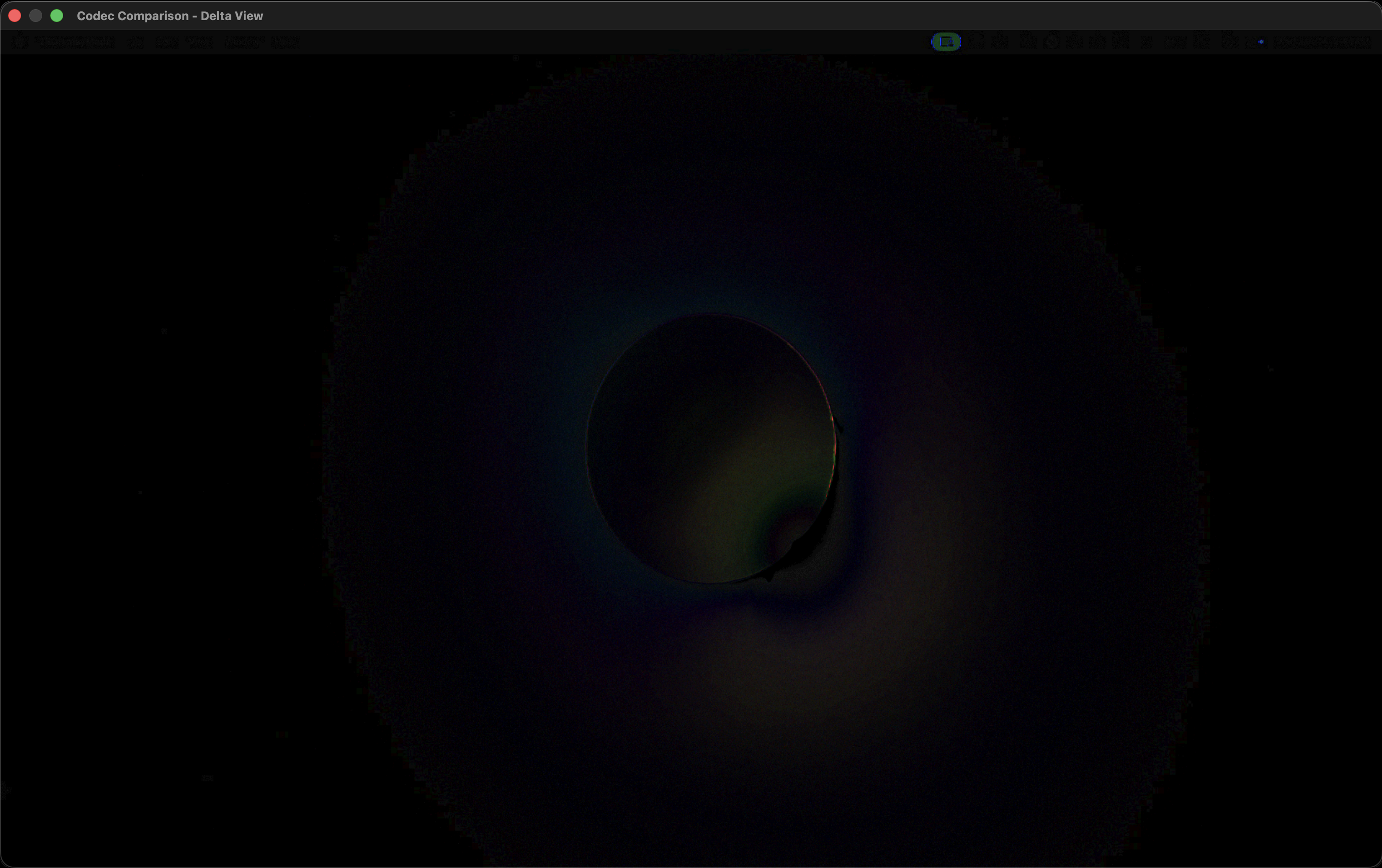
Delta view: ProRes 422 HQ — not even 4444 — and already much cleaner. Softer gradients, no banding, no chroma fringing.
The Catch?
ProRes doesn't have hardware acceleration on Windows.
For Apple to Apple streaming, ProRes is incredible. MacBook to Mac Studio over Thunderbolt? Chef's kiss. Visually very hard to tell the difference.
For Windows to Mac? We'd need to software-encode ProRes on the Windows side. That means CPU encoding at maybe 10fps instead of 60. Not viable.
Bandwidth is zero if you aren't active
5 Gbps sounds like a lot. But what does it actually mean for real-time video?
5 Gbps = 5,000 megabits per second
5,000 megabits ÷ 1000 milliseconds = 5 megabits per millisecond
At 60fps, we have 16.67ms per frame. At 5 Gbps, that's ~83 megabits we can transmit in one frame period. If we are transmitting for the entire duration.
When we compress we are spending precious milliseconds and therefore available bandwidth, this is sub-optimal.
Attempt 3: Parallelism
Here's an idea: what if we didn't wait for each step to complete sequentially?
A frame is just a grid of pixels. What if we split it into horizontal stripes, encoded each stripe independently, and started sending the first stripe while still encoding the rest?
That's striped encoding. The guest encodes stripes and pushes them to the network as they complete. The host receives stripes and starts decoding while more are still arriving. Two parallel pipelines instead of one sequential chain.
Three tracks running simultaneously. The host starts working before the guest finishes. Wall-clock time drops because we're not waiting anymore.
The Catch (Again)
Split HEVC encoding is RTX 4090 only. NVIDIA's split encoding API requires their latest architecture. Our 3090? Not supported.
So while this is conceptually beautiful — and the math works out to shave 3-5ms off the pipeline — we can't actually use it. Yet.
This is what engineering looks like. You find the elegant solution, then discover it requires hardware you don't have.
What Now?
We're not done. But we understand the trade-offs:
- Raw pixels are the goal, that's what a real cable does
- HEVC gets the bits through but sacrifices quality and adds latency (~10ms codec time)
- ProRes is perfect for Apple-to-Apple (~6.5ms codec time) but doesn't exist on Windows
- Striped encoding reduces latency but needs RTX 4090+
For Windows→Mac, HEVC at highest quality and intra-frame is the pragmatic choice. It works. It's not perfect — text is fuzzy, dark scenes suffer — but it's playable.
For Mac→Mac over Thunderbolt? ProRes is the sweet spot. Half the latency, visually indistinguishable from raw.
Key Takeaways
Think in bits per millisecond, not bits per second. For real-time systems, 5 Gbps = 5 megabits per millisecond. Frame budgets change the math.
Every codec has a design goal. HEVC minimizes bandwidth at the cost of latency and quality. ProRes preserves quality for professional editing — and happens to be fast. Raw is the baseline. Know what each tool optimizes for.
The laws of physics aren't optional. DisplayPort feels instant because it's scanout — pixels stream directly from GPU buffer to wire, line by line, no frame buffering, with guaranteed bandwidth.
Try It Yourself
Here's the interactive version. Change the connection type, resolution, and frame rate to see how your setup would perform:
What's Next
Every solution so far trades quality and latency for bandwidth. HEVC compresses a 60MB frame down to 0.2MB. But we have 5 Gbps — that's ~10MB per frame we could be using. We're leaving 98% of our bandwidth on the table.
What if we made a different trade-off? Use more bandwidth to buy back quality and speed. A codec that's dumber but faster. Compress less, transfer more, decode faster.